



Vollansicht
Ähnliche Gegenstände
T200 Dual-Mode Transparente Kabellose 2,4-GHz-/Bluetooth 5.0-Maus mit Magnetverschluss und RGB-Beleuchtung – Auf Lager
67.64109.62
Farbe : T200 Jugend Pink Dual-Modus

Menge :

Bericht
Urheberrechtsverletzungen einschließenKostenlos Standardversand. Siehe Einzelheiten
Geschätzt zwischen Wed, Jun 24 und Tue, Jul 14
Sie können das Produkt innerhalb von 30 Tagen nach Erhalt zurückgeben. Siehe Einzelheiten
Sorgenfrei einkaufen

Geld-Zurück-Garantie
Erhalten Sie den bestellten Artikel oder Ihr Geld zurück. Mehr erfahren
Über diesen Artikel
Quelle: Aura Bits
Der Verkäufer übernimmt die volle Verantwortung für dieses Angebot.Artikelnummer: 36795618
Artikelspezifikationen
Herkunft
DE
Funktionen
Matt, Andere, RGB
Achse
Andere, optische Achse, grüne Achse
Numerische Tastatur
Ja Nein
Produktart
Wiederaufladbare Maus, tragbare Maus, stumme Maus
Verbindung
Kabellos, Bluetooth, Andere
Größe
100 mm bis 120 mm, 121 mm bis 130 mm, < 100 mm
Zertifizierung
CE, UL, DOT
Artikelbeschreibung vom Verkäufer
Dimensions, weight, and packing quantity of T200:
Cord length: 30cm
Product weight: 72g
Product dimensions: 11.3x5.8x2.5cm
Packaging weight: 115g
Packaging dimensions: 12.3x7.5x3.5cm
Quantity per box: 60pcs
Packing dimensions: 37.5*26*28cm
Packing weight: 7.2kg
T200 dual-mode wireless mouse selling points:
Dual-channel 2.4G+Bluetooth connection, supports simultaneous connection to 2 devices, allowing for easy switching between them
Made of transparent PC material, with a clear and luminous appearance, showcasing a high-end texture, making you stand out in the office
3.Built-in 1600dpi three-speed adjustable sensor, precise operation, smooth scrolling, enhancing work efficiency
4.5 million times micro switch, mechanical keycap design, matte texture, fast rebound, and fast response
5.Multiple RGB lighting modes, full of personality, creating a cool desktop atmosphere, making your workspace more vibrant
charging, eliminating the hassle of tangled charging cables, making
more convenient use
7.Built-in 400mAh large-capacity lithium battery, strong e
Endurance, no need for frequent charging during long-term use, making your office life more convenient and worry-free
Product parameters:
Product model: T200 dual-mode wireless mouse
IC model: PixArt3065
Return rate: 125HZ
Connection method: 2.4+BT5.0
Lighting mode: RGB backlight 11 lighting modes
Mobile speed: 28IPS
Refresh rate: 3000FPS
Acceleration: 10G
Number of buttons: 4 keys
Key lifespan: 5 million times
Operation mode: photoelectric
Battery type: Built-in 400mAh rechargeable lithium battery
DPI: 800-1200-1600 dpi
Mouse material: fully transparent PC material
Roller material: silicone
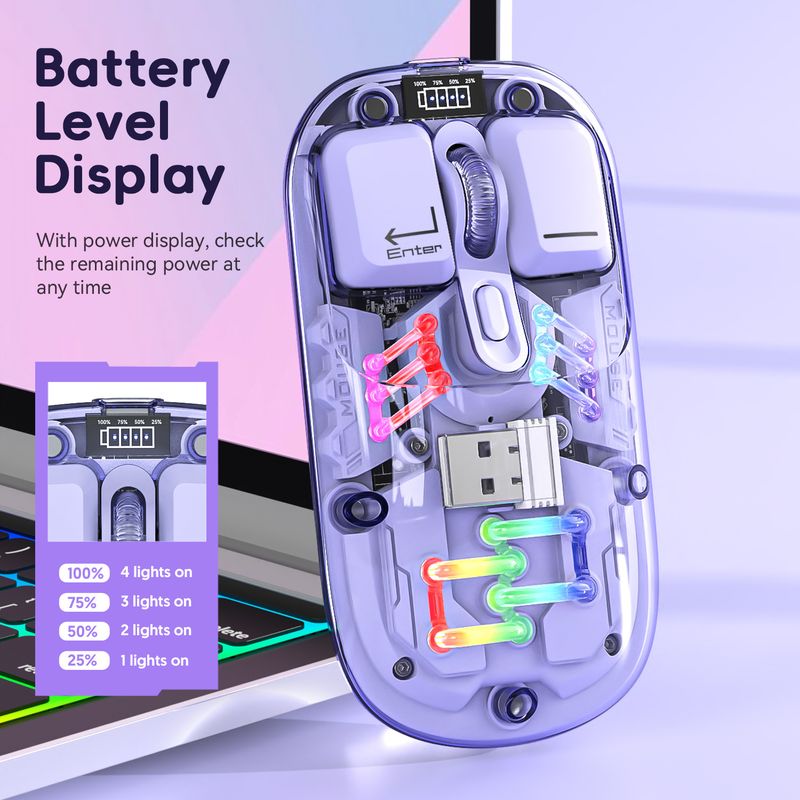
Battery display: 4-bar battery display key can be switched
Wireless distance: 10 meters
Charging interface: Type-C interface
Charging cable length: 30cm
Product size: 11.3x5.8x2.5cm
Product weight: 72g
Packaging size: 12.3x7.5x
3.5cm
Packaging weight: 115 g
Package includes :
1 x 2.4G+BT5
.0 Wireless Mouse
1 x USB Receiver
1 x Type-C Charging Cable 30CM
1 x Instruction manual
Operating systems:
Windows Vista
yes, Win7/8/10/11, ac OS X10.5 and later
Light operation:
Turn on the mouse switch, after successful connection, press the bottom button
of mouse Lighting mode switch key turn on the light mode
11 + 1 lighting modes can switch the light effectPress and hold
To turn off the light mode, press and hold to switch 11 light
effects
2.When there is no action on the mouse within 10 minutes, the mouse
will enter standby mode and all lights will be turned off
3.After entering sleep mode, press any key to re-enter connection and
The lights will automatically turn on
Installation and use steps: lower schematic:
12.4G wireless connection method:
Switch the button to 2.4G mode, plug in the USB receiver, the blue light is flashing, the mouse can be used. Power off when the switch is in the center position
position
2BT5.0 wireless connection method:
Switch t
Switch the BT mode button to BT, the blue light is flashing, the PC will automatically search for BT5.0 and confirm it, then it can be used; if you want to connect another PC, please switch the BT mode again and press the left button
Press the middle key for 3 seconds at the same time, the PC will search for the BT signal and choose to connect


Videos
Videos zu diesem Produkt

 4.4 von 5 basierend auf 9,249 bewertungen